For a change I’m stepping out of the IT space to a somewhat related subject. Solar power!
Last year we moved to a new house with more space for both of us to spread out and I’ve been busy with lots of urgent renovation related projects, but this spring I had a little bit of an extra budget and had put out most of the worst fires (figuratively speaking).
One thing about this place is that our electricity contract has something I’ve never seen before: two separate off-peak hour periods. This made me start thinking about the arbitrage possibilities with the « balcony solar » battery systems. Initially I wasn’t thinking about solar at all, but just being able to charge some batteries during off-peak hours and pushing that energy back out during peak hours. Being able to do that twice per day seemed to make the whole thing considerably more effective.
One reason this is particularly interesting for me is that my home lab is mildly excessive. I don’t run any heavy duty enterprise servers, but have tried to find low-power solutions as much as I can, but it does add up.
Side note: three classic Intel NUCs for a Proxmox cluster will run about 100W. So it’s the same as leaving the porch light on in the olden days.
When I said things add up, that works out to be a constant load of about 1.1kWh. After poking around a bit (and being influenced by Stephen Foskett’s comments) I decided to pull the trigger on an EcoFlow bundle including the big battery (Stream Ultra X) at 3,84 kWh of capacity with an adjunct Stream AC Pro with half of that capacity.
The interesting part of this generation of batteries is that they can serve as UPS’s, but I don’t yet trust them enough for the speed of the failover so I installed them feeding the existing UPS boxes. The interesting part of the « balcony solar » constraints are that you get the simplicity of feeding your internal home power grid from these batteries simply by plugging them into an existing wall socket where they can feed power out up to the local regulatory limits (900W in France). But you can get around this limit or add to it by plugging devices directly into the AC sockets on the battery. Since my main rack is the worst offender, constantly pulling about 500W this is where the big battery got installed. But the net result is that the battery can push 500W on the AC port and 900W to the rest of the house as required. The AC Pro ended up powering the network rack.
The second very important constraint with these systems is that they cannot push current into the home grid if there’s a power outage. This is a perfectly sensible safety precaution to protect electric workers who are working outside on circuits that are « dead » and you feeding power out could put them at risk. However, any devices plugged directly into the AC ports on these batteries are exempt from this restriction since they are purely local and pose no risk. So a fully charged 3,84 kWh battery feeding the rack becomes at 6+ hour UPS, something you can’t buy for love or money from your traditional UPS manufacturers. Well - actually you can these days, but just for lots and lots of money.
Hiccups and learning experiences
The first stage of the project with just the batteries was a mitigated success in that it did exactly what I expected in respecting the off-peak charging schedule and pushing power back out in the peak hours.
The first hiccup is that the batteries by themselves are pretty stupid. That’s to say that as soon as they hit that discharge schedule, they push out the maximum possible amount of power they are allowed, even if there’s nothing in your home that needs to consume it so those electrons end up going back out onto the main grid. This isn’t very efficient and I’m sending a bunch of my battery capacity back to my provider for no recompense.
The solution to this is a Smart Meter (separate from the one that your provider uses for monitoring your usage) that can talk to the batteries on the network and tell them what the local consumption requirements are and to push out an appropriate amount of power rather than just the maximum possible. These are pretty simple devices that install into your electric panel that have Hall effect sensors that go over the main input wires (it’s just a clip - no direct connection involved) to monitor the usage and report that over the wifi network to the batteries. It’s probably a good idea to get an electrician to install this, but if you’re handy, it’s not really that complicated to install.
It’s not 100% real-time, so if you fire up the coffee machine, the initial draw will come briefly from the grid for a few seconds until the meter can tell the battery to start pushing out the required power. Similarly when the power drops off there will be a brief moment where the battery is pushing out more than is needed and the surplus goes back to the grid. In practical terms, this is a negligeable amount.
Now that I’ve got the system running more efficiently, I start studying the numbers (somewhat obsessively) and notice the other hiccup: most of this generation of battery systems are Lithium-Ion based, just like most cars, phones and computers. To get a maximum life-span out of them you’re really not supposed to charge them to 100% and drain them flat. Different models have different recommendations, but I settled on a range of 25%-95%. This means that the 3.84kWh battery actually only has a useful capacity of about 2.7kWh. Plus of course the losses of converting AC->DC and back again (which generally runs about 8-12% on mine. Still, with all of that taken into account the ROI showed it paying back the cost in just under 6 years. Not great, not bad and that timeline gets shorter every time the electricity prices go up (a sadly predictable event).
The good news is that the next generation of these systems are probably going to based on Sodium-Iontechnology which has the added benefit that you can go from zero to 100% without affecting the performance or lifespan of the battery. Ecoflow just pre-announced the next generation of their Stream batteries coming in September 2026 that don’t explicitly say they’re using this technology, but the spec sheet certainly leads me to believe this.
Adding solar
After going on a deep dive learning about the intricacies of using solar panels, digging through the impacts of getting multiple panels and connecting them in parallel vs in series, it turns out that most of that stuff is really only of concern if you’re building a fairly large setup with hefty inverters. In the consumer space a couple of things have changed the calculus, notably that there are inexpensive, high capacity panels available so in a lot of cases, you don’t have to worry about pairing up panels since their capacity matches pretty nicely with the input capacity of the inverters out there.
On the cost front, the panels are becoming a smaller and smaller proportion of the cost of these projects (outside of the batteries). I found at the local hardware big box store 460W panels going for 105€!
The additional costs that will add up are things like the mounting kits and wires. Copper is expensive!
My initial foray started with the Ecoflow Micro Inverter which can handle two inputs connected to two panels and plugged into an outdoor wall socket. That worked just fine and I could see an immediate impact on my power usage and the associated bill.
Stage 2
Then I decided to add some more capacity and use the inverter built into the Stream Ultra X box running the rack which has 4 inputs. Here’s where the extra costs started coming in. Since I needed to plug the panels in directly this time and there’s some distance between the panels and the spot I found outside for the battery I needed lots of cables and those cost half of the price of the panels.
With a total of 6 panels, I’m seeing peak production under ideal conditions hitting 2kW which means that for a while during the day, there’s enough power to run everything in the house and extra spills over back into the batteries which means I need to draw less to fill them up. It also provides less power in the late afternoon, but that’s enough to stretch the battery capacity out another couple of hours into the evening as the batteries only have to provide the difference instead of shouldering all of the load.
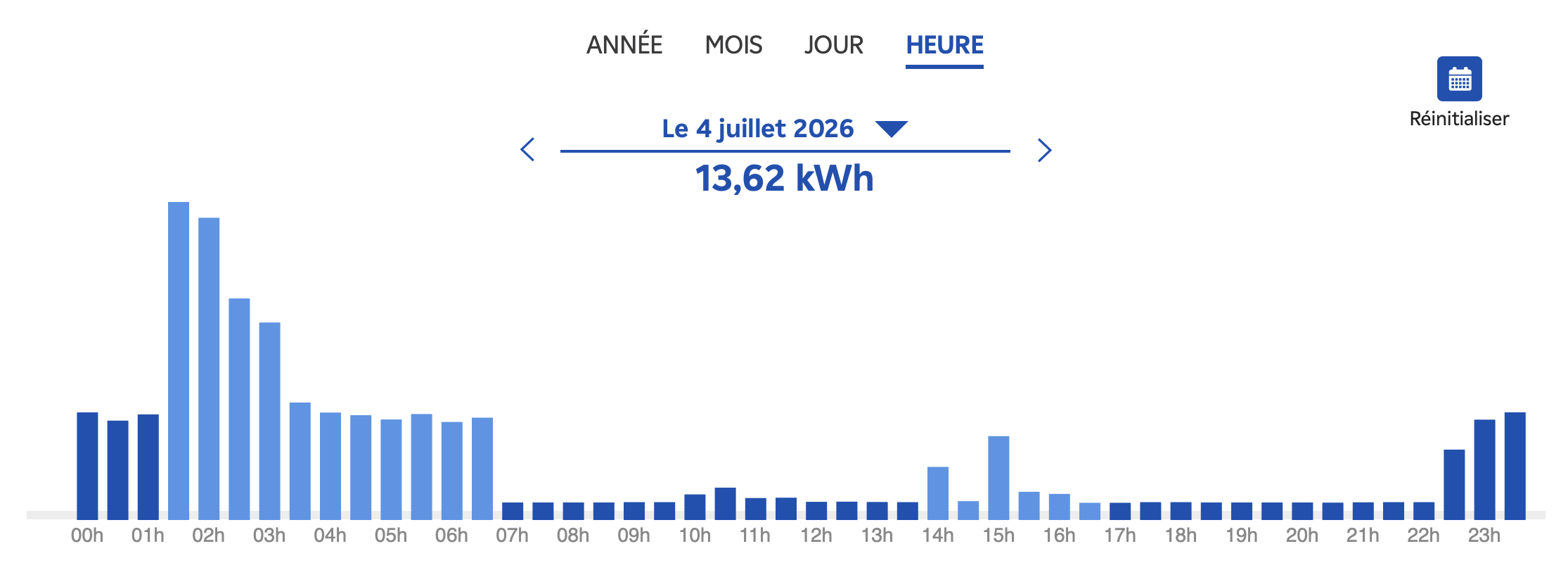
Net result is that I’m saving between 100-150€/month, which changes the ROI calculation pretty drastically. The panels pay for themselves in 4 months, and the rest is less than two years.
Caveat: I’m doing these calculations in the summer with the longer days. To match these numbers in the winter doldrums, I’m going to need to add more panels.
Mounting kits
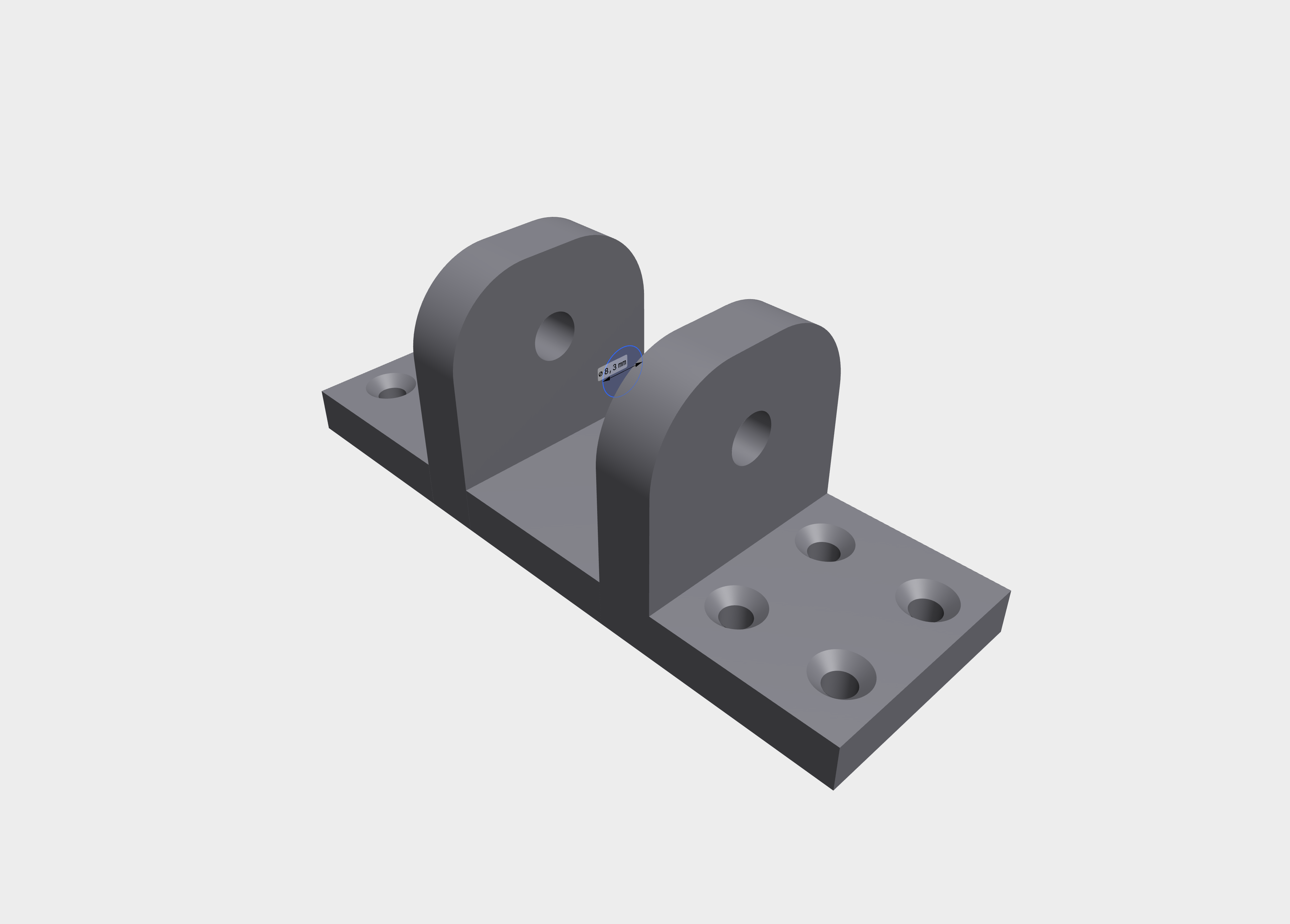
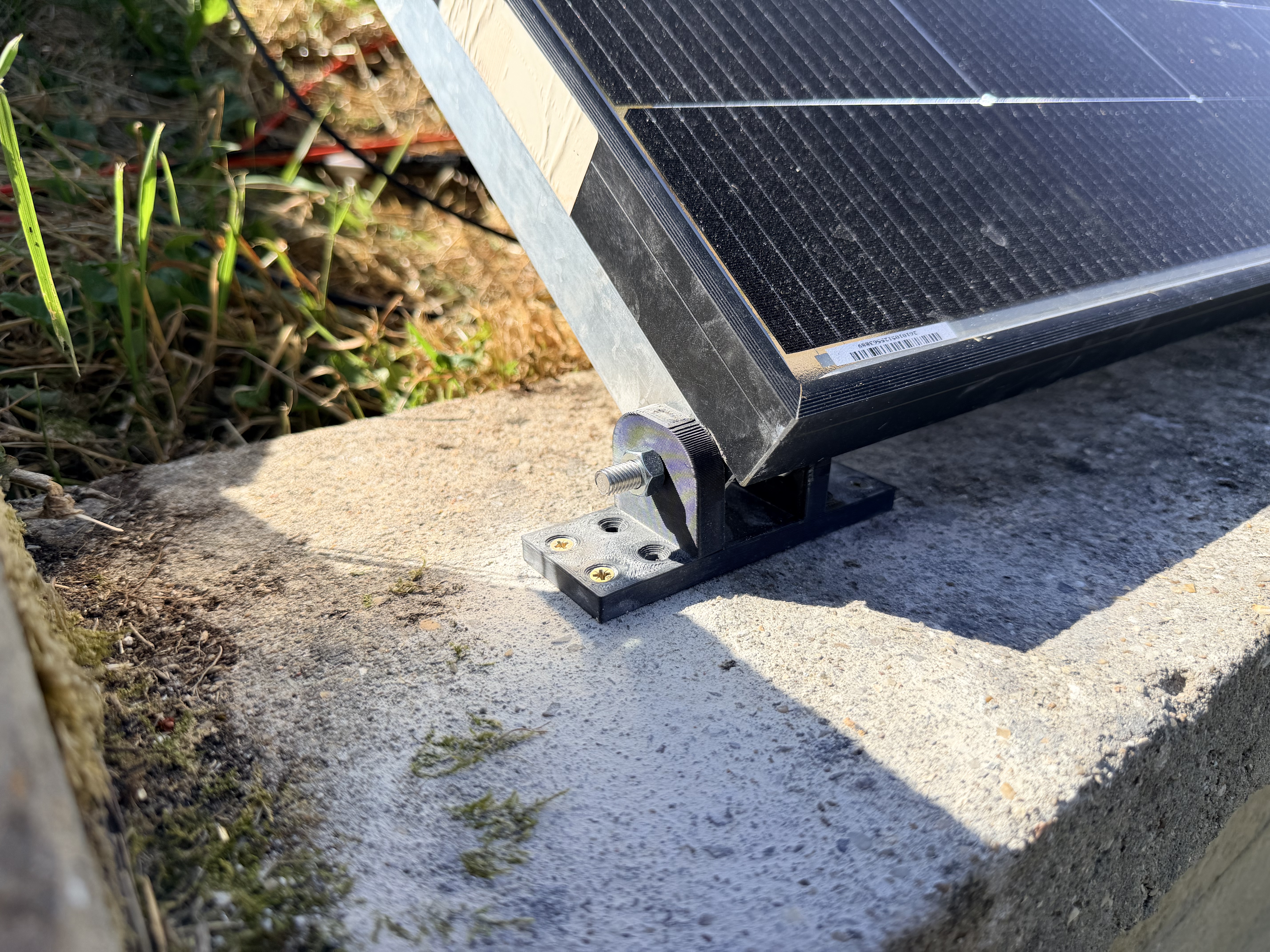
These are generally horribly expensive, even when shopping on AliExpress and various similar platforms. In the end, I ended up 3D printing some feet and attaching them with M8 bolts to some square aluminum tubing that I manually drilled mounting holes into. This covers the base side of things nicely and then I just cobbled together some wood frames to hold them at the appropriate angles.
Miscellaneous observations
This stuff has gotten a lot easier with pre-packaged systems and standard connectors.
Panels (at least in the EU) can be purchased dirt-cheap. Corollary: everything physical around them can be expensive.
Panels don’t need to go on the roof. Any open space that gets good sunlight will do the job. This also reduces/eliminates the installation costs. Also in many cases eliminates the whole permitting nonsense.
Don’t buy battery systems right now (summer 2026) as the next generation is on the horizon (September) and will offer a much better bang for the buck.
Panels are awkward and heavy so plan on having someone to help you. It’s doable alone, but much easier with two people.
Solar panels without batteries are of limited usefulness unless you have lots of power draw during the day or your provider has a decent offer for buying the extra power you produce. From what I gather those offers are drying up as providers deploy solar and have the same production cycle as you.
It’s fun!
Now onto integrating all of this into Home Assistant so that I can make my own pretty graphs…